
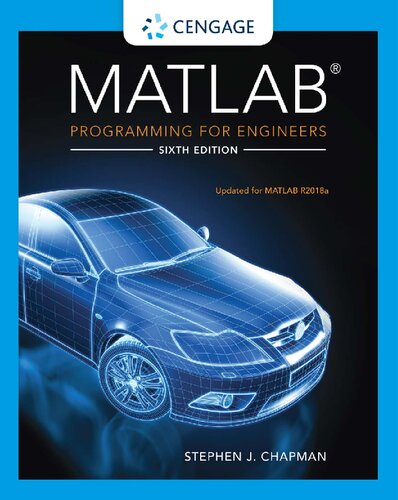
MATLAB Programming for Engineers 6th Edition by Stephen Chapman ISBN 0357030397 978-0357030394

Original price was: $50.00.$25.00Current price is: $25.00.
MATLAB Programming for Engineers 6th Edition by Stephen Chapman – Ebook PDF Instant Download/Delivery: 0357030397, 978-0357030394
Full download MATLAB Programming for Engineers 6th edition after payment
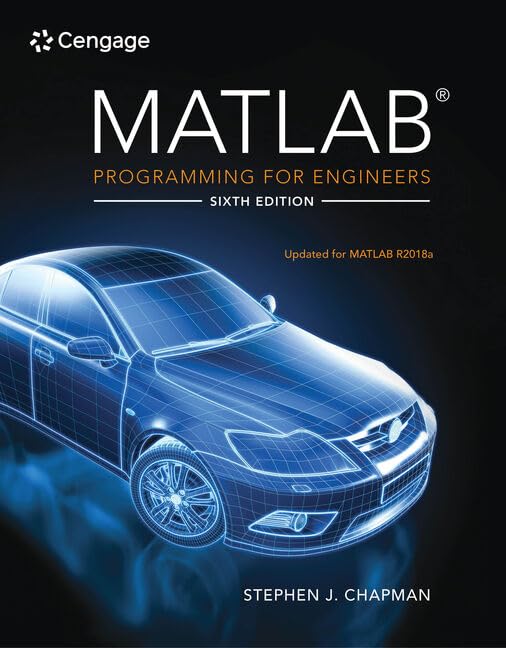
Product details:
ISBN 10: 0357030397
ISBN 13: 978-0357030394
Author: Stephen Chapman
Master today’s MATLAB technical programming language while strengthening problem-solving skills with the help of Chapman’s successful MATLAB PROGRAMMING FOR ENGINEERS, 6th Edition. You learn how to write clean, efficient and well-documented programs as you simultaneously gain an understanding of the many practical functions of MATLAB. You study the latest version of MATLAB R2018a and work with new MATLAB GUI (Graphical User Interface) Apps. The first nine chapters provide a basic introduction to programming and problem solving, while the remaining chapters address more advanced topics, such as I/O, object-oriented programming, and Graphical User Interfaces. With this comprehensive coverage, MATLAB PROGRAMMING FOR ENGINEERS, 6th Edition serves as a trusted reference tool throughout your studies and into your professional career as you work with MATLAB.
MATLAB Programming for Engineers 6th Table of contents:
Chapter 1. Introduction to MATLAB
1.1. The Advantages of MATLAB
1.2. Disadvantages of MATLAB
1.3. The MATLAB Environment
1.3.1. The MATLAB Desktop
1.3.2. The Command Window
1.3.3. The Toolstrip
1.3.4. The Command History Window
1.3.5. The Document Window
1.3.6. Figure Windows
1.3.7. Docking and Undocking Windows
1.3.8. The MATLAB Workspace
1.3.9. The Workspace Browser
1.3.10. The Current Folder Browser
1.3.11. Getting Help
1.3.12. A Few Important Commands
1.3.13. The MATLAB Search Path
1.4. Using MATLAB as a Calculator
1.5. MATLAB Script Files
1.5.1. Setting Up a Problem to Solve
1.5.2. Creating a Simple MATLAB Script File
1.6. Summary
1.7. Exercises
Chapter 2. MATLAB Basics
2.1. Variables and Arrays
2.2. Creating and Initializing Variables in MATLAB
2.2.1. Initializing Variables in Assignment Statements
2.2.2. Initializing with Shortcut Expressions
2.2.3. Initializing with Built-In Functions
2.2.4. Initializing Variables with Keyboard Input
2.3. Multidimensional Arrays
2.3.1. Storing Multidimensional Arrays in Memory
2.3.2. Accessing Multidimensional Arrays with One Dimension
2.4. Subarrays
2.4.1. The end Function
2.4.2. Using Subarrays on the Left-Hand Side of an Assignment Statement
2.4.3. Assigning a Scalar to a Subarray
2.5. Special Values
2.6. Displaying Output Data
2.6.1. Changing the Default Format
2.6.2. The disp Function
2.6.3. Formatted Output with the fprintf Function
2.7. Data Files
2.8. Scalar and Array Operations
2.8.1. Scalar Operations
2.8.2. Array and Matrix Operations
2.9. Hierarchy of Operations
2.10. Built-in MATLAB Functions
2.10.1. Optional Results
2.10.2. Using MATLAB Functions with Array Inputs
2.10.3. Common MATLAB Functions
2.11. Introduction to Plotting
2.11.1. Using Simple xy Plots
2.11.2. Printing a Plot
2.11.3. Multiple Plots
2.11.4. Line Color, Line Style, Marker Style, and Legends
2.12. Examples
2.13. MATLAB Applications: Vector Mathematics
2.13.1. Vector Addition and Subtraction
2.13.2. Vector Multiplication
2.14. MATLAB Applications: Matrix Operations and Simultaneous Equations
2.14.1. The Matrix Inverse
2.15. Debugging MATLAB Programs
2.16. Summary
2.17. Exercises
Chapter 3. Two-Dimensional Plots
3.1. Additional Plotting Features for Two-Dimensional Plots
3.1.1. Logarithmic Scales
3.1.2. Controlling x- and y-axis Plotting Limits
3.1.3. Plotting Multiple Plots on the Same Axes
3.1.4. Creating Multiple Figures
3.1.5. Subplots
3.1.6. Controlling the Spacing between Points on a Plot
3.1.7. Enhanced Control of Plotted Lines
3.1.8. Enhanced Control of Text Strings
3.2. Polar Plots
3.3. Annotating and Saving Plots
3.4. Additional Types of Two-Dimensional Plots
3.5. Using the plot Function with Two-Dimensional Arrays
3.6. Plots with Two y Axes
3.7. Summary
3.8. Exercises
Chapter 4. Branching Statements and Program Design
4.1. Introduction to Top-Down Design Techniques
4.2. Use of Pseudocode
4.3. The logical Data Type
4.3.1. Relational and Logic Operators
4.3.2. Relational Operators
4.3.3. A Caution About the == and ~= Operators
4.3.4. Logic Operators
4.3.5. Logical Functions
4.4. Branches
4.4.1. The if Construct
4.4.2. Examples Using if Constructs
4.4.3. Notes Concerning the Use of if Constructs
4.4.4. The switch Construct
4.4.5. The try/catch Construct
4.5. More on Debugging MATLAB Programs
4.6. Code Sections
4.7. MATLAB Applications: Roots of Polynomials
4.8. Summary
4.9. Exercises
Chapter 5. Loops and Vectorization
5.1. The while Loop
5.2. The for Loop
5.2.1. Details of Operation
5.2.2. Vectorization: A Faster Alternative to Loops
5.2.3. The MATLAB Just-In-Time (JIT) Compiler
5.2.4. The break and continue Statements
5.2.5. Nesting Loops
5.3. Logical Arrays and Vectorization
5.3.1. Creating the Equivalent of if/else Constructs with Logical Arrays
5.4. The MATLAB Profiler
5.5. Additional Examples
5.6. The textread Function
5.7. MATLAB Applications: Statistical Functions
5.8. MATLAB Applications: Curve Fitting and Interpolation
5.8.1. General Least-Squares Fits
5.8.2. Cubic Spline Interpolation
5.8.3. Interactive Curve-Fitting Tools
5.9. Summary
5.10. Exercises
Chapter 6. Basic User-Defined Functions
6.1. Introduction to MATLAB Functions
6.2. Variable Passing in MATLAB: The Pass-by-Value Scheme
6.3. Optional Arguments
6.4. Sharing Data Using Global Memory
6.5. Preserving Data between Calls to a Function
6.6. Built-In MATLAB Functions: Sorting Functions
6.7. Built-In MATLAB Functions: Random Number Functions
6.8. Summary
6.9. Exercises
Chapter 7. Advanced Features of User-Defined Functions
7.1. Function Functions
7.2. Function Handles
7.3. Functions eval and feval
7.4. Local Functions, Private Functions, and Nested Functions
7.4.1. Local Functions
7.4.2. Private Functions
7.4.3. Nested Functions
7.4.4. Order of Function Evaluation
7.4.5. Function Handles and Nested Functions
7.4.6. The Significance of Function Handles
7.5. An Example Application: Solving Ordinary Differential Equations
7.6. Anonymous Functions
7.7. Recursive Functions
7.8. Plotting Functions
7.9. Histograms
7.10. An Example Application: Numerical Integration
7.11. Summary
7.12. Exercises
Chapter 8. Complex Numbers and Additional Plots
8.1. Complex Data
8.1.1. Complex Variables
8.1.2. Using Complex Numbers with Relational Operators
8.1.3. Complex Functions
8.1.4. Plotting Complex Data
8.2. Multidimensional Arrays
8.3. Gallery of MATLAB Plots
8.4. Line Plots
8.4.1. The plot3 Function
8.4.2. Changing the Viewpoint of Three-dimensional Plots
8.4.3. The fplot3 Function
8.4.4. The fimplicit Function
8.5. Discrete Data Plots
8.5.1. The stem3 Function
8.5.2. The scatter Function
8.5.3. The scatter3 Function
8.6. Polar Plots
8.6.1. The compass Function
8.6.2. The ezpolar Function
8.7. Contour Plots
8.7.1. Function contour
8.7.2. Function contourf
8.7.3. Function contour3
8.7.4. Function fcontour
8.8. Surface and Mesh Plots
8.8.1. Creating Surface and Mesh Plots
8.8.2. Creating Three-Dimensional Objects Using Surface and Mesh Plots
8.8.3. Ribbon Plots
8.8.4. Function pcolor
8.8.5. Functions fsurf and fmesh
8.8.6. Function fimplicit3
8.9. Pie Charts, Bar Plots, and Histograms
8.9.1. The area Function
8.9.2. Bar Plots
8.9.3. Two-Dimensional Histograms
8.10. Color Order, Color Maps, and Color Bars
8.10.1. Plot Color Order
8.10.2. Color Maps
8.10.3. Color Bars
8.11. Summary
8.12. Exercises
Chapter 9. Additional Data Types
9.1. Character Arrays versus Strings
9.1.1. Character Arrays
9.1.2. Strings
9.2. Character Arrays and Character Functions
9.2.1. Character Array Conversion Functions
9.2.2. Creating Two-Dimensional Character Arrays
9.2.3. Concatenating Character Arrays
9.2.4. Comparing Character Arrays
9.2.5. Searching/Replacing Characters within a Character Array
9.2.6. Uppercase and Lowercase Conversion
9.2.7. Trimming Whitespace from Strings
9.2.8. Numerical-to-Character Array Conversions
9.2.9. String-to-Numerical Conversions
9.3. The string Data Type
9.3.1. Creating Strings
9.3.2. Converting Data into Strings
9.3.3. Converting Strings to Other Data Types
9.3.4. Concatenating Strings
9.3.5. Comparing Strings
9.3.6. Searching for Substrings within a String
9.3.7. Extracting Substrings from a String
9.3.8. Inserting Strings into a String
9.3.9. Replacing Characters within a String
9.3.10. Erasing Characters in a String
9.3.11. Uppercase and Lowercase Conversion
9.3.12. Trimming Whitespace from Strings
9.4. Summary of Character Array and String Functions
9.5. The single Data Type
9.6. Integer Data Types
9.7. Limitations of the single and Integer Data Types
9.8. The datetime and duration Data Types
9.8.1. The datetime Data Type
9.8.2. The duration Data Type
9.8.3. calendarDuration Arrays
9.8.4. Time Calculations
9.8.5. Using Time Data in MATLAB
9.9. Summary
9.10. Exercises
Chapter 10. Sparse Arrays, Cell Arrays, Structures, and Tables
10.1. Sparse Arrays
10.1.1. The sparse Attribute
10.2. Cell Arrays
10.2.1. Creating Cell Arrays
10.2.2. Using Braces {} as Cell Constructors
10.2.3. Viewing the Contents of Cell Arrays
10.2.4. Extending Cell Arrays
10.2.5. Deleting Cells in Arrays
10.2.6. Using Data in Cell Arrays
10.2.7. Cell Arrays of Strings
10.2.8. The Significance of Cell Arrays
10.2.9. Summary of cell Functions
10.3. Structure Arrays
10.3.1. Creating Structure Arrays
10.3.2. Adding Fields to Structures
10.3.3. Removing Fields from Structures
10.3.4. Using Data in Structure Arrays
10.3.5. The getfield and setfield Functions
10.3.6. Dynamic Field Names
10.3.7. Using the size Function with Structure Arrays
10.3.8. Nesting Structure Arrays
10.3.9. Summary of structure Functions
10.4. Table Arrays
10.4.1. Creating Table Arrays
10.4.2. Accessing Data in a Table
10.4.3. Table Metadata (Properties)
10.4.4. Examining the Contents and Properties of a Table
10.4.5. Table Summary
10.5. Summary
10.6. Exercises
Chapter 11. Input-Output Functions
11.1. The textread Function
11.2. More about the load and save Commands
11.3. An Introduction to MATLAB File Processing
11.4. File Opening and Closing
11.4.1. The fopen Function
11.4.2. The fclose Function
11.5. Binary I/O Functions
11.5.1. The fwrite Function
11.5.2. The fread Function
11.6. Formatted I/O Functions
11.6.1. The fprintf Function
11.6.2. Understanding Format Conversion Specifiers
11.6.3. How Format Strings Are Used
11.6.4. The sprintf Function
11.6.5. The fscanf Function
11.6.6. The fgetl Function
11.6.7. The fgets Function
11.7. Comparing Formatted and Binary I/O Functions
11.8. File Positioning and Status Functions
11.8.1. The exist Function
11.8.2. The ferror Function
11.8.3. The feof Function
11.8.4. The ftell Function
11.8.5. The frewind Function
11.8.6. The fseek Function
11.9. The textscan Function
11.10. Function uiimport
11.11. Summary
11.12. Exercises
Chapter 12. User-Defined Classes and Object-Oriented Programming
12.1. An Introduction to Object-Oriented Programming
12.1.1. Objects
12.1.2. Messages
12.1.3. Classes
12.1.4. Static Methods
12.1.5. Class Hierarchy and Inheritance
12.1.6. Object-Oriented Programming
12.2. The Structure of a MATLAB Class
12.2.1. Creating a Class
12.2.2. Adding Methods to a Class
12.2.3. Listing Class Types, Properties, and Methods
12.2.4. Attributes
12.3. Value Classes versus Handle Classes
12.3.1. Value Classes
12.3.2. Handle Classes
12.4. Destructors: The delete Method
12.5. Access Methods and Access Controls
12.5.1. Access Methods
12.5.2. Access Controls
12.5.3. Example: Creating a Timer Class
12.5.4. Notes on the MyTimer Class
12.6. Static Methods
12.7. Defining Class Methods in Separate Files
12.8. Overriding Operators
12.9. Events and Listeners
12.9.1. Property Events and Listeners
12.10. Exceptions
12.10.1. Creating Exceptions in Your Own Programs
12.10.2. Catching and Fixing Exceptions
12.11. Superclasses and Subclasses
12.11.1. Defining Superclasses and Subclasses
12.11.2. Example Using Superclasses and Subclasses
12.12. Summary
12.13. Exercises
Chapter 13. Handle Graphics and Animation
13.1. Handle Graphics
13.2. The MATLAB Graphics System
13.3. Object Handles
13.4. Examining and Changing Object Properties
13.4.1. Changing Object Properties at Creation Time
13.4.2. Changing Object Properties after Creation Time
13.4.3. Examining and Changing Properties Using Object Notation
13.4.4. Examining and Changing Properties Using get/set Functions
13.4.5. Examining and Changing Properties Using the Property Editor
13.5. Using set to List Possible Property Values
13.6. User-Defined Data
13.7. Finding Objects
13.8. Selecting Objects with the Mouse
13.9. Position and Units
13.9.1. Positions of figure Objects
13.9.2. Positions of axes and polaraxes Objects
13.9.3. Positions of text Objects
13.10. Printer Positions
13.11. Default and Factory Properties
13.12. Restoring Default Properties
13.13. Graphics Object Properties
13.14. Animations and Movies
13.14.1. Erasing and Redrawing
13.14.2. Creating a Movie
13.15. Summary
13.16. Exercises
Chapter 14. MATLAB Apps and Graphical User Interfaces
14.1. How a Graphical User Interface Works
14.2. Creating and Displaying a Graphical User Interface
14.2.1. The Structure of a Callback Function (Method)
14.2.2. Adding Application Data to a Figure
14.3. Object Properties
14.3.1. Key Properties of Numerical Components
14.3.2. Key Properties of Text Components
14.4. Additional Containers: Panels, Tab Groups, and Button Groups
14.4.1. Panels
14.4.2. Tab Groups
14.4.3. Button Groups
14.5. Dialog Boxes
14.5.1. Alert Dialog Boxes
14.5.2. Confirmation Dialog Boxes
14.5.3. Input Dialog Boxes
14.5.4. The uigetfile, uisetfile, and uigetdir Dialog Boxes
14.5.5. The uisetcolor and uisetfont Dialog Boxes
14.6. Menus
14.6.1. Creating Your Own Menus
14.6.2. Accelerator Keys and Keyboard Mnemonics
14.7. Summary
14.8. Exercises
People also search for MATLAB Programming for Engineers 6th :
introduction to matlab programming for engineers 1st edition
introduction to numerical methods and matlab programming for engineers
borrow matlab programming for engineers
matlab programming for engineers 7th edition
coursera matlab programming for engineers and scientists specialization
You may also like…
Mathematics - Numerical Analysis
Applied Numerical Methods with MATLAB for Engineers and Scientists, 5th Edition Steven Chapra

Earth Sciences - Geology
Computers - Programming
MATLAB for Engineers Global Edition 5th Edition by Holly Moore ISBN 9781292231204 1292231203
Mathematics - Mathematical Statistics
Statistics for Engineers and Scientists, 6th Edition by William Navidi 1266115838 9781266115837

Engineering - Engineering Technology
Matlab A Practical Introduction to Programming and Problem Solving 6th Edition Stormy Attaway
Engineering - Engineering Technology
MATLAB and Simulink Crash Course for Engineers Eklas Hossain

Business & Economics

Technique - Aerospace Equipment